Wednesday, June 26, 2013

Advertising on Google: The High Performance Cookbook

I am excited to announce that after a long year of work, my book Advertising on Google: The High Performance Cookbook was published today. The book is a step-by-step guide with practical tips and lots of examples and screenshots to help you run effective Adwords campaigns.

5849EN_0You'll learn how to:

  • Set up your Adwords account and track results beyond the click

  • Create relevant keywords and write compelling ads

  • Run reports, analyze, manage AdWords, and troubleshoot performance

  • Implement display strategies, including remarketing

  • Optimize performance for maximum ROI


I'd like to thank my publisher, Packt Publishing, for proposing this project to me and for moving it forward. If you have any feedback or comments, please feel free to email me.

Wednesday, June 19, 2013

Upgrade Your AdWords Sitelinks with Additional Details

AdWords recently updated their sitelink policy to allow for optional sitelink descriptions that are unique to each individual sitelink. The additional text can help you win more ad real estate and allow you to further pre-qualify your visitors.


In order to use enhanced sitelinks, you’ll need to upgrade your campaigns to enhanced (if you have not already).


In your campaign management tab, go into a campaign you wish to edit. You can also go into a specific ad group if you wish to create sitelinks unique to an ad group.


Click on Ad extensions and choose Sitelink Extensions from the drop down.


sitelinks 1


Click to Edit the Sitelink extension and choose to create a +New sitelink. Write in your Link text (25 characters max) and choose a Link URL. Under Description, add in additional copy to further describe the specific sitelink page you are linking to.


sitelinks 2


You can even set specific starts and end dates, or days and hours, if you wish to only show a sitelink during specific times.


Please note that your ads will not always show sitelinks, and when they do, the format can vary. Also, sitelinks only show in the top ranked ads that are promoted to ad positions above the organic search results.


Continue to monitor your account, including performance for each sitelink you have set-up. In your ad extensions tab, click on Segment and choose This Extension vs. Other to see how each sitelink contributes to your clicks and conversions. If you're noticing that a sitelink is under-performing, consider changing the link language and description details, or try a different sitelink.


sitelinks 3

Tuesday, February 12, 2013

Enhanced Campaigns Step-By-Step Update Process

Now that AdWords has announced their major system update to enhanced campaigns, the option to upgrade your current campaigns will start appearing in your accounts. This post discusses the steps to make the switch and highlights a few key new settings to explore.

If your campaign is eligible to be upgraded to the new system you’ll see the following message:

step 1


Next, you’ll get the option to adjust your bids for mobile. Make sure to review past mobile performance for each campaign before making a decision. You can choose to keep mobile bids the same as desktop and tablets, increase them, or decrease. If your mobile CPA has been higher than from other devices, I recommend decreasing mobile bids. Unfortunately, you do not have an option to adjust tablet bids. They will be the same as your desktop bids. 


step 2


Next, you’ll get the following message that you have upgraded.

STEP 3
Once you upgrade, you’ll be able to make changes to your sitelinks and ads, among other new features. Here are a few setting you may wish to explore:


Sitelinks - Navigate to your sitelinks to upgrade to the new version. Once you do, you can customize your sitelink extensions for mobile versus desktops/tablets. You'll also be able to use a custom schedule for each sitelink. Best of all, there is now  an option to create ad group level sitelinks.


sitelinks


Ads - Click to edit an existing ad if you’d like to make it mobile-preferred. These ads will be given preferences on mobile devices.


Mobile preferred


Location bids - Navigate to your campaign location settings tab to edit bids by location.


Location bids


If you have multiple campaigns, switch to enhanced with smaller volume campaigns while you learn the new features and get used to the interface updates. Best of luck!

Thursday, February 7, 2013

What You Need to Know About AdWords Enhanced Campaigns

AdWords announced today a major change called enhanced campaigns. This change will affect all advertisers and will impact ad serving. Below, I discuss the major changes, challenges, questions, and resources.

Key Changes


  1. Manage bids across devices, locations and time within a single campaign. Many advertisers split up campaigns by devices, so they can optimize bids and budgets and use different settings for desktops, mobile, and tablets. Moving forward, advertisers will be forced to use the same campaign for mobile, tablets, and desktops. You'll be able to adjust bids for each device, but not budgets. This could be problematic for advertisers who have much smaller budgets for mobile, for example. One great new feature is the ability to adjust bids (by using bid multipliers) for regions/cities that are more profitable.

  2. Ads customized to user context. Showing the right creative, sitelink, app or extension based on user context and device capabilities. You'll be able to set "preferences" within each campaign to show ads, apps, extensions or sitelinks depending on device. Ad copy management and optimization might get even more complicated.

  3. Advanced reporting. We'll be able to track new conversion types such as calls, digital downloads, and cross device conversions.


Questions, Challenges & New Features


I was able to run some of my question by our Google rep and I am summarizing the highlights below.

  • Budgets. My first question was if we'll be able to set different budgets by device and the answer is no. We will not be able to set different budgets for desktops, mobile, and tablets. In enhanced campaigns, budgets will continue to be managed at the campaign level via an individual campaign budget or a shared campaign budget. Similar to hybrid campaigns today, this budget may run across all devices, and advertisers will not be able to set device-specific budgets within an account or a campaign.

  • Bidding: For desktop/tablet bidding, you'll set a dollar amount. Mobile will function as a % of desktop. It will not be possible to set individual keyword-level bids on mobile. This is definitely a concern, especially for advertisers tracking conversions closely and with strict CPA goals.

  • Opting out of mobile/tablets. The good news is that you can bid down mobile keywords 100% to opt out completely. The bad news is that tablets will always have the same bid as desktop, so you cannot opt out or adjust bids specifically for tablets.

  • Pausing ad groups/keywords by device. You can pause mobile at the campaign level only, by bidding down 100%. However, you won't be able to do this the other way around because all bids will be pinned to the desktop/tablet bid. For example, you could set your desktop bids to $0.05 and then bid up on mobile by up to 300%, making an effective mobile bid of $0.15.

  • Reporting. One of the advantages of having separate campaigns for different devices is aggregate reporting. For example we can easily filter out all mobile campaigns and compare their performance against tablets or desktops. Having all devices lumped into one campaigns will make this much more difficult. AdWords is not planning any major reporting changes at this time. You will still be able to see reporting for mobile/tablet/desktop, using “Device” as a segment, but device numbers will need to then be multiplied across all campaigns to get your totals.

  • Mobile ads/URLs. Some of my clients use different URLs for mobile ads. Advertisers will still be able to create mobile preferred ads but there is no such thing as mobile only ads, which we could previously accomplish with separate mobile campaigns. However, mobile preferred ads will almost never show on other devices, unless your ads for other devices are missing or disapproved. On the side, universal ads will almost never show on mobile, unless you are missing mobile ads or they are disapproved. So, generally speaking, mobile URLs or mobile only ads should not be an issue if you set your ad preferences.

  • Automated rules. Automated rules will be compatible with enhanced campaigns. However, it does't sounds like you'll be able to set rules for tablet-only campaigns, since all tablet bids are shared by desktop. Again, this is not ideal, as it would be nice to automate bidding for tablets specifically based o tablet specific conversion data. AdWords does not yet support adjusting mobile bid modifiers via automated rules. It may be in the pipeline later this year.

  • Call forwarding: Google will no longer charge $1 for the call forwarding feature. Also, you'll have the option to show your own phone number in ads on desktops and tablets, previously only available through call forwarding a number Google assigned you.


Resources


Timeline


This change will start rolling out slowly to all advertisers over the next few weeks but we will not be required to fully switch over to enhanced campaigns just yet. All advertisers will need to eventually migrate to enhanced campaigns by mid-2013. I recommend you start slow by migrating your lower volume campaigns while you learn the new features and capabilities.

Wednesday, December 5, 2012

Edit Your AdWords Campaigns in Bulk

AdWords just released a bulk editing feature that you can easily access within the interface. You can now make edits to thousands of ads, keywords, bids, destination URLs, and other attributes from within your account.

I’ve found the new bulk edit most useful for editing match types and bids, and for making ad text changes that apply to numerous ad groups and campaigns. Just highlight the ad groups or keywords you’d like to edit. The Edit menu is now a drop down button with various options to choose from.

Here is an example of how this will look like if you’d like to edit CPC bids in bulk. In your AdWords account, go to tab Keywords and select the keyword you’d like to adjust bids for. Go to Edit and choose Change max CPC bids... and click Preview to see what changes will be made.


You can even review the recent bulk edits you made from within the Edit menu.


UI bulk editing should make AdWords management a lot faster and save us having to use AdWords Editor for some of the more complex account management work.

Friday, October 5, 2012

Should You Use Shared Budgets in AdWords?

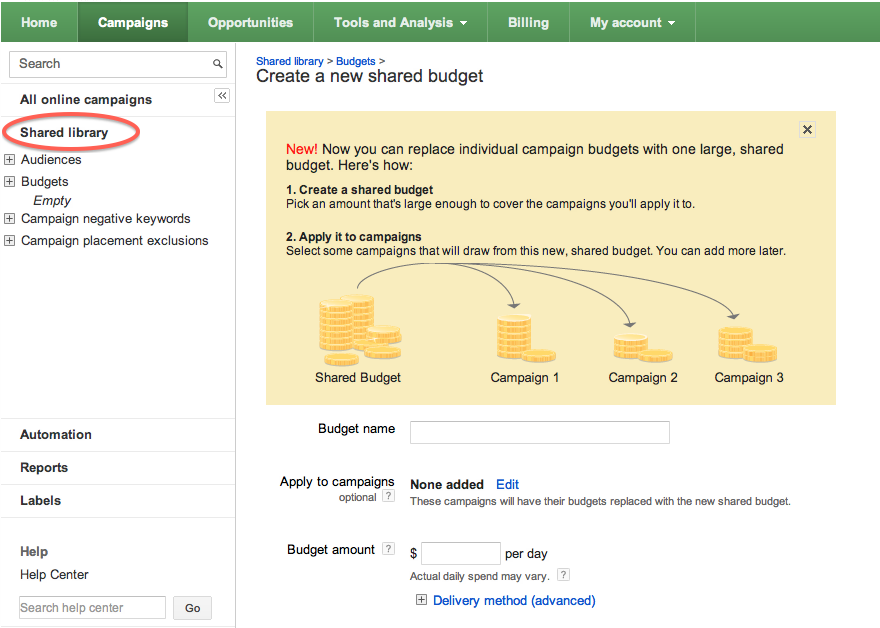
The new shared budgets feature in AdWords is great for those looking to streamline management and not stress out about going over their set ad spend amounts. You have the option to assign specific campaigns to your budget and AdWords will distribute spend across those campaigns. Another advantage of this feature is that if there is more traffic available via certain campaigns, AdWords will maximize ad visibility across campaigns you assign to shared budgets to increase your clicks.

You can find the tool via your AdWords campaign management page under the Shared Library section. Simply name your budget, assign campaigns you want included and set your daily budget amount.


While this is a good option for advertisers who do not have the time to manage their campaigns and adjust budgets frequently, I would not recommend it to more savvy advertisers with multiple campaigns, who are watching conversions closely. Your campaigns are likely converting very differently, and I recommend adjusting budgets based on conversion data, rather than traffic, which is what shared budgets will accomplish for you.

One creative way you could use shared budgets is to assign your top performing campaigns (that you already know tend to convert better for you) a higher percentage of your total available marketing dollars. For example, if you have a total budget of $100 per day, you could create a shared budget of $70 for your top converting campaigns, and a separate budget of $30 for your low performers.